Your invoices and receipts, with GST and QST calculated for you.
SkyTarget's invoicing creates an invoice from an appointment, calculates GST (5%) and QST (9.975%), and produces a PDF receipt with your registration numbers and the practitioner's member number. The receipt is emailed in your clinic's name, and your finances show the GST and QST to remit.
Included from the Essentiel plan: $39 per month, no contract.
What's on the receipt
- An “OFFICIAL RECEIPT”. Invoice number, issue date and date of service, made out to your client.
- The practitioner. Their name, profession, association and member number, with their address and phone number.
- The taxes. GST (5%) and QST (9.975%), with your registration numbers and your NEQ.
- The details. Treatments, add-ons, discount, subtotal and amount received.
- The payment. The payment date and method (card, cash, cheque or transfer), with an electronic signature.
- The client's language. The receipt comes out in French or English, depending on your client.
From appointment to receipt
- 1The invoice is createdFrom the appointment, or on its own. It starts as a draft, and a draft never goes out as a receipt.
- 2You issue itIt takes the next number, with no gaps in the numbering.
- 3You record the paymentCard, cash, cheque or transfer: the invoice is marked as paid.
- 4The receipt goes outBy email in your clinic's name, with the PDF attached; the email itself shows no amount and no treatment.
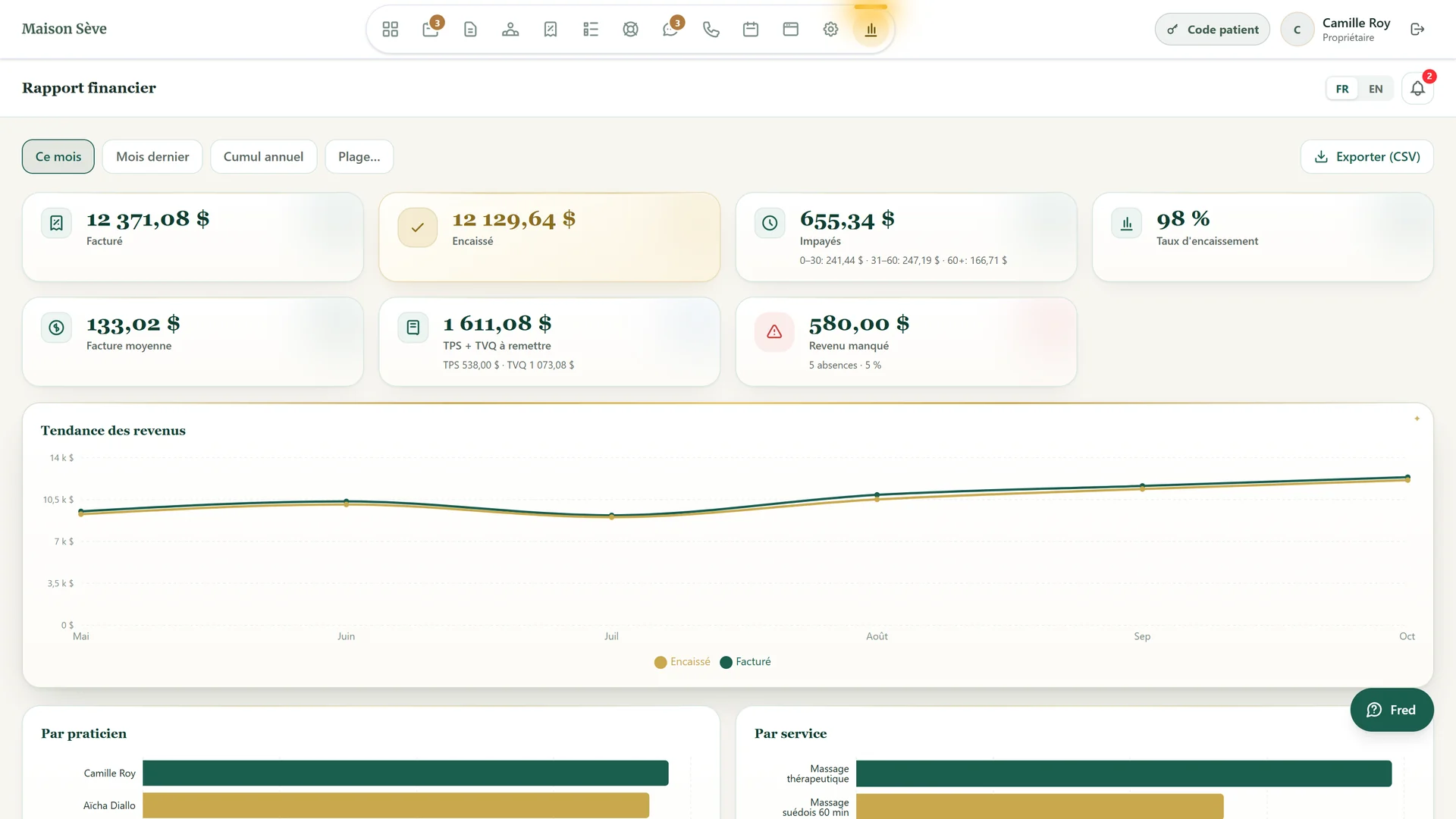
Your finances at a glance
- Billed and collected. What you've billed and what you've actually collected.
- GST + QST to remit. The tax amount to remit, calculated from your invoices.
- The 6-month trend. How your revenue has moved over the last six months.
- A CSV export. To bring your numbers into a spreadsheet or hand them to your accountant.
- Each email's status. Your invoice list shows whether each receipt was sent, failed to send or wasn't delivered.
- Taxable or not. You set, treatment by treatment and add-on by add-on, what's taxable.
What invoicing doesn't do
SkyTarget doesn't bill insurers directly and doesn't take payments online: payments received are recorded by hand.
The receipt shows the practitioner's association and member number, but its acceptance by each insurer hasn't been verified. With the client app (Signature plan), your client finds their invoices and shares their PDF receipt; they don't get a notice there for a new invoice yet.
Frequently asked questions
Does SkyTarget calculate GST and QST?
Yes: GST (5%) and QST (9.975%), based on what you mark as taxable, treatment by treatment and add-on by add-on. Your registration numbers appear on the receipt.
Does the practitioner's member number appear on the receipt?
Yes. The practitioner enters their association and member number in their settings, and they print on every receipt.
Do insurers accept the receipt?
Your client hands the receipt to their insurer. It shows the practitioner's association and member number, but its acceptance by each insurer hasn't been verified, and SkyTarget doesn't bill insurers directly.
Can my clients pay online?
No. You record the payment received: card, cash, cheque or transfer.
How is the receipt sent?
By email, in your clinic's name, with the PDF attached. The email itself shows neither the amount nor the treatment.
Which plan includes invoicing?
From the Essentiel plan: $39 per month, plus taxes, with no contract.